Email CRM integration has become essential for successful email marketing in 2026, yet many businesses still overlook it. Mark spent $4,000 on a holiday email campaign. It flopped—not because the design was bad, but because his emails had no idea who his customers actually were.
Mark runs a mid-sized furniture store in Ohio. He sent the same discount email to everyone on his list, including customers who had purchased the exact same couch just two weeks earlier.
Instead of feeling valued, those customers felt ignored. Several unsubscribed the very same day. Mark’s team couldn’t understand what went wrong because their email marketing platform and customer database never shared information.
Stories like Mark’s happen to thousands of businesses across the United States every year. The solution isn’t sending more emails—it’s connecting the tools you already use. In this guide, you’ll learn why email CRM integration is critical and how it helps businesses deliver more personalized campaigns that increase engagement and sales.
Learn more
Email Marketing in 2026 Complete Guide from Setup to Automation and Conversions
What Is Email CRM Integration?
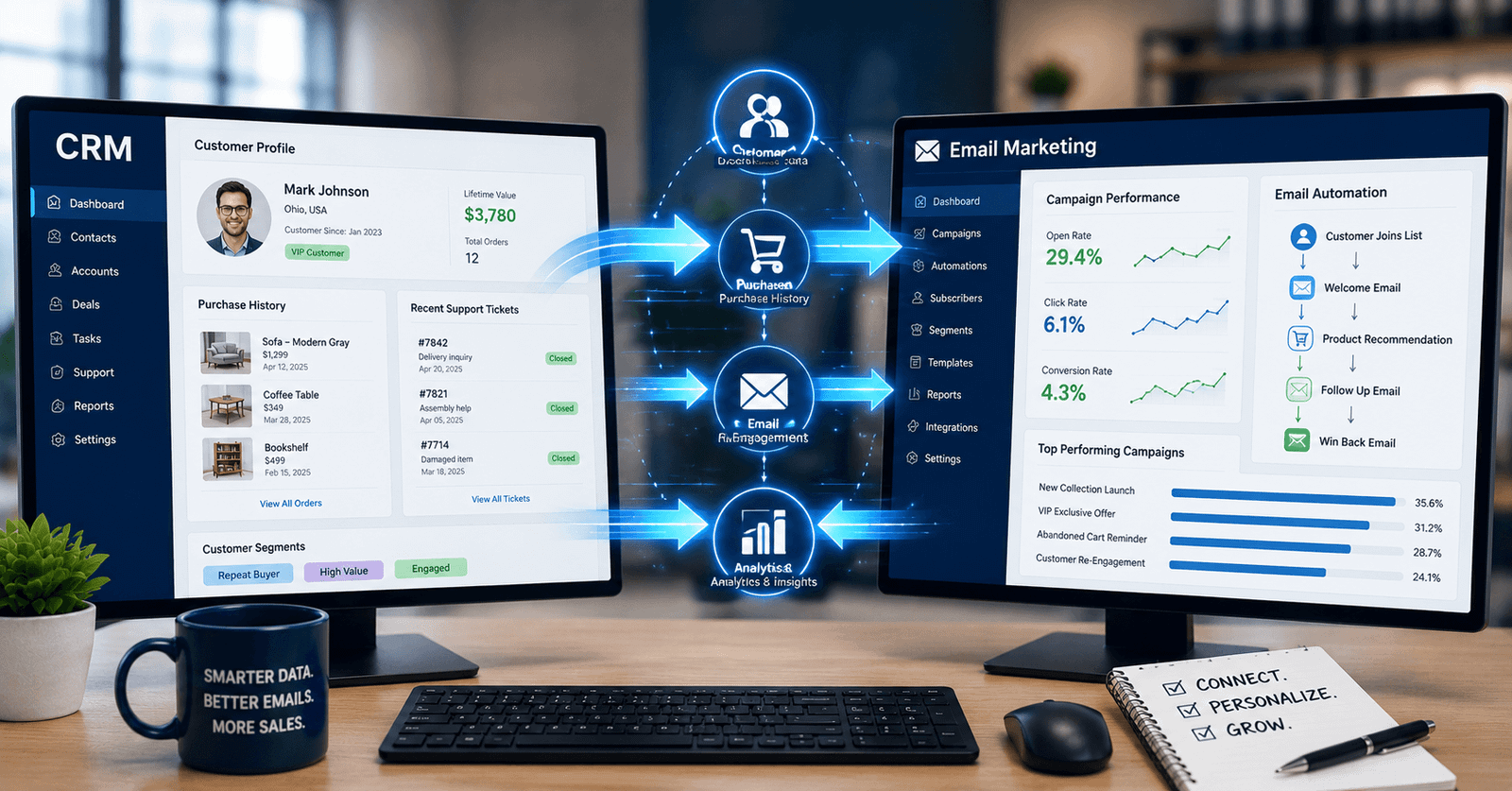
Email CRM integration connects your email marketing platform with your customer relationship management system. This lets both tools share data automatically.
Your CRM holds details like purchase history, support tickets, and customer preferences. Your email tool uses that data to send smarter, more personal messages.
Without this connection, your email platform is basically guessing. It sends the same message to everyone, regardless of what they’ve already done.
Why Email Marketing Fails Without CRM Integration
Most failed email campaigns share the same root cause. The email tool and the CRM work in isolation.
Your Emails Feel Generic
When systems don’t talk, every customer gets the same message. A first-time buyer and a loyal customer see identical content. This kills engagement fast.
You Miss Timing Opportunities
A CRM knows when a customer last purchased or contacted support. Without integration, your emails can’t react to these moments in real time.
Your Data Stays Scattered
Sales data lives in one place. Email data lives in another. Nobody gets the full picture of the customer, so decisions get made on guesswork.
You Waste Money on Wrong Targeting
According to industry research from Salesforce, connected customer data leads to notably higher marketing ROI than disconnected systems. Every email sent to the wrong segment is money spent with no return.
Learn more
Difference Between Email Marketing and Social Media Marketing
Real Case Study: How Email CRM Integration Helped One US Business
After his failed holiday campaign, Mark hired a marketing consultant. The very first recommendation was simple: connect the email platform to the CRM.
Here’s what changed after the integration:
- Purchase history synced automatically, so past buyers stopped getting duplicate offers
- Customer segments updated in real time, based on CRM activity
- Follow-up emails triggered automatically after support tickets closed
- Personalized subject lines used the customer’s actual product history
Three months later, Mark’s open rates rose from 14% to 29%. Unsubscribes dropped by half. His next seasonal campaign brought in 40% more revenue than the failed one.
How to Fix Email Marketing With CRM Integration
Fixing this problem doesn’t require starting over. It just requires a clear plan.
Step 1: Audit Your Current Tools
Check what email platform and CRM you’re using today. Confirm whether they already offer a native integration option.
Step 2: Clean Your Customer Data First
Bad data makes any integration weaker. Remove duplicate contacts and fix incomplete customer records before connecting systems.
Step 3: Set Up Two-Way Data Sync
Make sure data flows both ways. Your CRM should update your email tool, and your email activity should update your CRM.
Step 4: Build Segments Based on CRM Behavior
Use real customer actions to build email lists. Think purchase history, support activity, and loyalty status.
Step 5: Test Before You Scale
Run a small campaign first. Confirm the data syncs correctly before sending to your full list.
Learn more
Benefits of Email CRM Integration for US Businesses
Connecting these systems creates results that generic email campaigns simply cannot match.
- Higher open rates from relevant, personal content
- Fewer unsubscribes because customers feel understood
- Better sales tracking, showing which emails actually drive revenue
- Stronger customer relationships built on real interaction history
- Less wasted ad and email spend through smarter targeting
Common Email CRM Integration Mistakes Businesses Make
Even with the right intention, businesses often stumble during setup.
- Skipping the data cleanup step before connecting systems
- Choosing tools that don’t support native integration
- Forgetting to train the team on the new connected workflow
- Not testing the sync before a big campaign launch
- Ignoring CRM permissions and privacy settings
Conclusion
Email marketing doesn’t fail because businesses send too few emails. It fails because those emails don’t know the customer receiving them. Email CRM integration solves this by connecting your customer data directly to your campaigns.
Start small. Clean your data, connect your tools, and test before you scale. Like Mark’s furniture store, your next campaign could turn silence into real sales.
FAQs
A. It’s the process of connecting your email marketing tool with your CRM system. This lets both platforms share customer data automatically.
A. Without integration, emails can’t use real customer data. This leads to generic messages, poor timing, and lower sales results.
A. Many popular email and CRM platforms offer built-in integrations at no extra cost. Custom setups may cost more, depending on complexity.
A. A basic integration can take a few hours to a few days. Larger businesses with messy data may need a few weeks for a full, clean setup.
A. Yes. Even small customer lists benefit from personalized, well-timed emails. Integration helps small teams work smarter, not harder.