Why AI videos look unprofessional is a question every creator asks after their first failed upload. You spent hours generating a video. It looked amazing in the preview. Then viewers called it “fake” and “robotic” in the comments.
This sting is real. A content marketer named Leila faced this exact problem. She used an AI tool to create product videos for her online store. The results looked strange. Faces glitched. Voices sounded flat. Sales didn’t move.
Leila almost gave up on AI video. Instead, she studied what top creators were doing differently. She found 11 small mistakes were making her videos look cheap, and fixed every one of them.
This article shares those same 11 mistakes and their fixes. By the end, you’ll know exactly why AI videos look unprofessional, and how to make yours look polished and real.
Learn more
Best AI Video Tools in 2026: The Complete Guide for Creators, Marketers & Businesses
Why AI Videos Look Unprofessional in the First Place
AI video tools are powerful, but they aren’t perfect. Small technical gaps create a big trust problem with viewers.
Most unprofessional AI videos share these root causes:
- Rushed generation with no editing
- Ignoring small details like lighting and pacing
- Using default settings instead of customizing the output
Leila found her early videos had almost all of these issues at once.
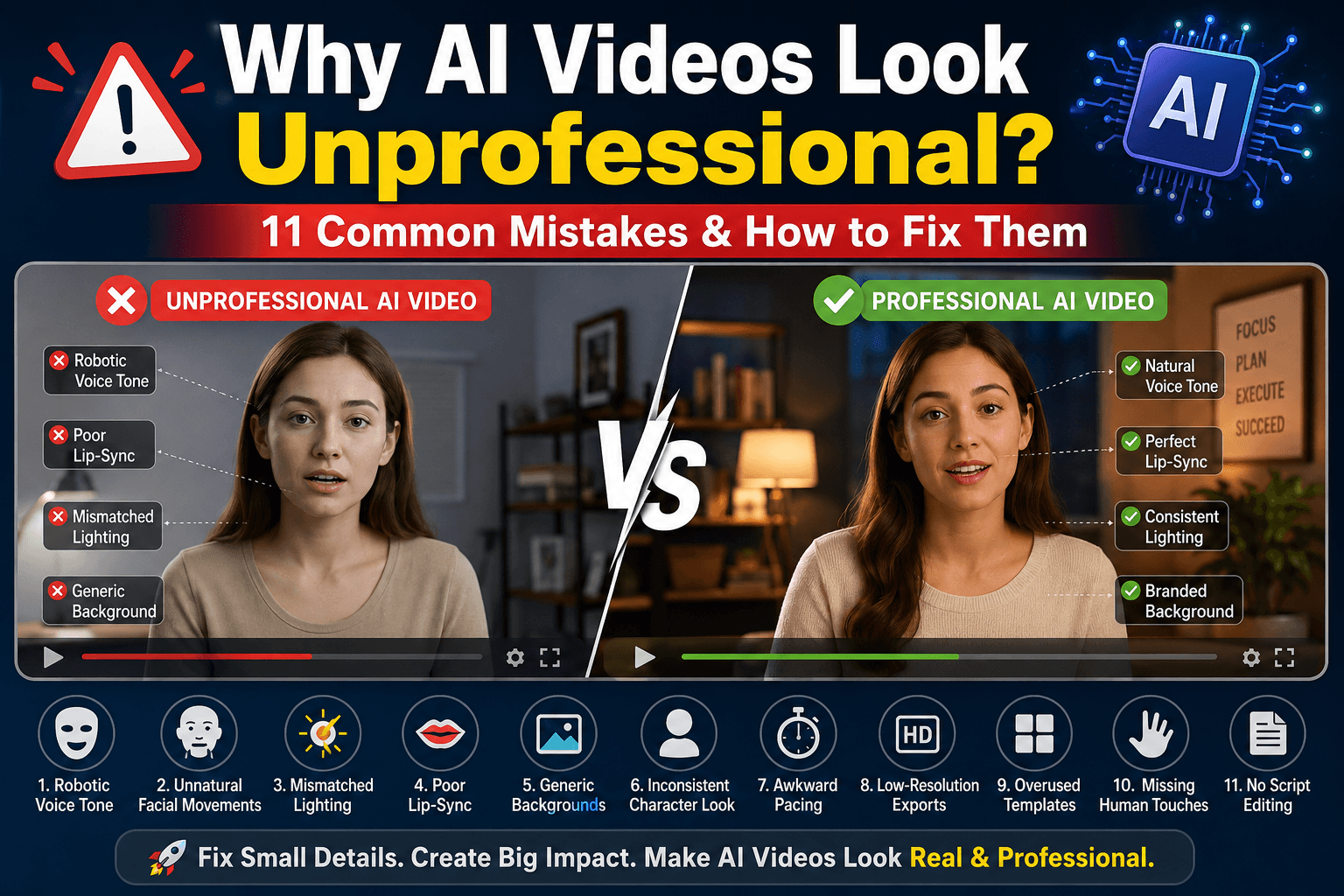
11 Reasons Why AI Videos Look Unprofessional
Here are the exact mistakes Leila found, and how she fixed each one.
Mistake 1: Robotic Voice Tone Makes AI Videos Look Unprofessional
AI voices often sound flat and emotionless. Viewers notice this within seconds.
Fix it: Choose a voice model with natural pacing. Add slight pauses where a real person would breathe.
Mistake 2: Unnatural Facial Movements
Some AI avatars blink too much or move stiffly. This creates an uncanny, robotic look.
Fix it: Pick tools with realistic facial animation. Preview clips before finalizing your video.
Mistake 3: Mismatched Lighting
AI-generated scenes sometimes mix light sources that don’t match. Shadows fall the wrong way.
Fix it: Use consistent lighting prompts. Review each scene for shadow direction before exporting.
Mistake 4: Poor Lip-Sync
Words and mouth movements that don’t match instantly break trust with viewers.
Fix it: Slow down your script pacing. Choose tools known for strong lip-sync accuracy.
Mistake 5: Generic Stock Backgrounds
Overused AI backgrounds make your video blend into hundreds of others.
Fix it: Customize backgrounds with your brand colors or unique scene details.
Mistake 6: Inconsistent Character Look
Some tools change a character’s face slightly between scenes. This confuses viewers.
Fix it: Lock character settings before generating multiple scenes.
Mistake 7: Awkward Pacing
Scenes that cut too fast or drag too long feel unnatural and hard to watch.
Fix it: Edit your timeline manually. Trim dead space between key moments.
Mistake 8: Low-Resolution Exports
Blurry or pixelated video instantly signals low effort to viewers.
Fix it: Always export in the highest resolution your platform supports.
Mistake 9: Overused AI Templates
Viewers can now spot common AI templates. Overused styles feel repetitive and cheap.
Fix it: Adjust templates with your own script, colors, and pacing choices.
Mistake 10: Missing Human Touches
Perfectly smooth AI videos can feel cold. Viewers connect with small imperfections.
Fix it: Add natural gestures, casual phrasing, or a slight camera shake for realism.
Mistake 11: No Script Editing
Many creators use AI-generated scripts without editing them. This creates stiff, robotic dialogue.
Fix it: Rewrite key lines in your own natural voice before generating the video.
Learn more
AI Video Marketing Tools That Actually Increase Engagement
How to Fix Why AI Videos Look Unprofessional
Leila didn’t fix everything at once. She tackled one mistake per video.
Here’s the simple process she followed:
- Watch your video fully before publishing.
- List anything that feels off, even small details.
- Fix one issue at a time, starting with voice and lip-sync.
- Re-render and compare the new version side by side.
This slow, steady process turned her rough videos into polished, professional content.
Learn more
Can AI Replace Video Editors? Real Experiment in 2026
Real Results After Fixing Why AI Videos Look Unprofessional
Within two months, Leila’s product videos looked noticeably better.
- Viewer drop-off dropped by 30%, since videos felt more natural.
- Comments about “fake” or “robotic” footage disappeared almost completely.
- Product page conversions rose by 15%, since videos built more trust.
These results came from comparing her first ten AI videos against her next ten, after applying the fixes.
Conclusion: Why AI Videos Look Unprofessional and How You Can Fix It
Now you know exactly why AI videos look unprofessional, and it usually comes down to small, fixable details. Voice tone, lighting, pacing, and script quality all matter more than most creators realize.
Start with one video. Fix one mistake at a time. Compare your results.
Like Leila, you can turn stiff, robotic AI footage into content that feels polished, trustworthy, and real.
FAQs
A. Most issues come from rushed generation and skipped editing, not the tool itself. Small fixes like better pacing and lip-sync make a big difference.
A. Yes, with careful editing. Adjusting voice tone, lighting, and script quality can make AI videos look close to professionally filmed content.
A. Using default settings without customization. This leads to robotic voices, generic backgrounds, and repetitive templates.
A. Yes. Studies on video engagement show viewers drop off quickly when something feels unnatural, even if they can’t name the exact issue.
A. Most creators see noticeable improvement after fixing just three or four key issues, like voice tone, lip-sync, and pacing.